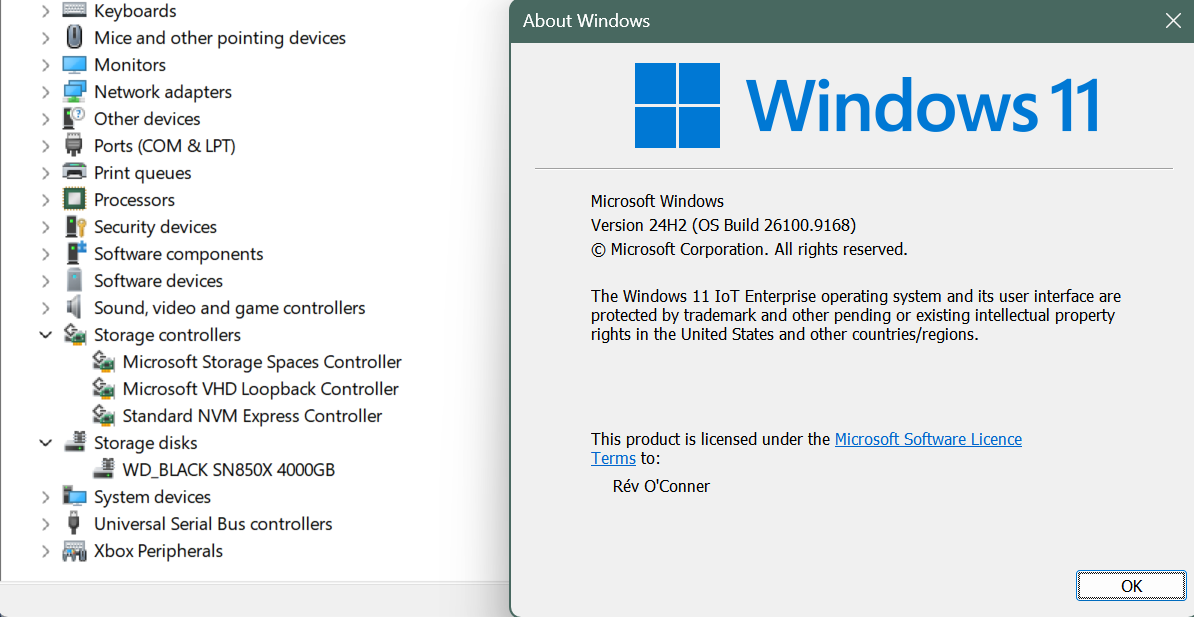
Enabling NVME driver support in Win 11 24H2 bypassing Microsoft blocked flags
Trying to enable native native NVME driver on Windows 11 LTSC 26100.8875+ and how I succeeded in bypassing feature blocked by Microsoft.
Recently, while trying browsing Reddit, as one does, I came accross a post saying Windows 11 has now a way on Windows 25H2 and server 2025 to enable a native driver for NVME drives that increases IOPS quite a lot. Since I have a WD SN850X 4TB and have never gotten anywhere near to what speeds I should get, I was quite interested in it.
On a bit of web search, it turned out that I had seen the post too late, which it used to be possible, the possibility got removed from Windows build 26100, and on the version I was in 26100.8875, no solution which had previously worked, did so anymore. A normal person would have given up, and waited for Microsoft to enable this via some future Windows update, but I dove deep, seeing as I already had all the drivers on the system present, what was blocking was the plumbing.
reg add "HKLM\SYSTEM\CurrentControlSet\Enum\INSTANCE\Device Parameters\StorPort" /v EnableNVMeInterface /t REG_DWORD /d 1 /f
Result in one paragraph
Adding one DWORD registry value named EnableNVMeInterface, set to 1, under the NVMe controller's own "Device Parameters\StorPort" key, and rebooting, switched the boot SSD from the legacy SCSI translation stack (disk.sys over Storport) to the native NVMe stack (nvmedisk.sys) on Windows 11 IoT Enterprise 24H2 build 26100.8875, a build where every published feature-flag method fails. Random IOPS roughly doubled. The value is read by storport.sys itself, it is not a hack on the driver files, and it is removed with one reg delete and a reboot.
The change has survived two windows updates and now I am on 26100.9168 as of writing this blog.
How it works and what microsoft updates actually blocked
the routine that runs each time a storage controller is added (RaDriverAddDevice) in storport.sys (10.0.26100.8737), decides between the legacy adapter and the native NVMe adapter like this. T
- If the controller's bus type is not NVMe: set to legacy.
- If the global marker DisableNativeNVMeStack is set (it comes from a registry value ):set to legacy.
- If the controller driver advertises the multi-queue capability (a flag bit the miniport sets when it registers):
- on a client edition of Windows, native = the value of GeNativeNVMeEnabledForClient (fed by feature 60786016, NativeNVMeStackForGeClient)
- on a server edition, native = GeNativeNVMeEnabledForServer (feature 59274315) or Servicing_NativeNVMe (feature 59254307, which is the official Server 2025 switch, registry name 1176759950)
- Then it reads the registry value EnableNVMeInterface from the controller's own "Device Parameters\StorPort" key. If the read succeeds: native = (value is not zero). This overrides whatever step 3 decided.
- If native was requested but the miniport does not advertise the capability: native = off.
- Native builds the NVMe adapter (CreateNvmeAdapter), which enumerates the drive as NVME\NVMEDISK with the GenNvmeDisk id, so nvmedisk.inf attaches. Legacy builds the SCSI adapter (RaidCreateAdapter), which enumerates SCSI\DISK with GenDisk, so disk.inf attaches.
So the value is a per-controller "force native on" (1) or "force native off" (0) that beats the feature flags. It is a genuine Storport setting, read through Storport's normal device-key reader, alongside other documented-style per-adapter settings. It is not documented anywhere public that could be found.
NOTE: The feature flags above talks about the previously documented flags from vivetool that is no longer needed.
How I went about diagnosing it.
- I installed Windows server 2025 on Hyper-V so I have a working comparable copy of all the drivers and files. (This wasn't much of a help except confirm the files involved are same where they match)
- Getting the Microsoft public symbols pdb
- Getting the device GUID, to find the involved files in question.
- Debugging and tracing registry values of each file involved in the NVME stack.
- Enumeration of the feature descriptors compiled into
storport.sys, mapping of every reference to the four globalsGeNativeNVMeEnabledForClient,GeNativeNVMeEnabledForServer,DisableNativeNVMeStackandg_OSisClient - Manual decoding of the
RaDriverAddDeviceroutine where a registry read of "StorPort" / "EnableNVMeInterface" sits right after the flag checks.- The helper scripts used for this (feature-scan.ps1, feature-descriptors.ps1, feature-symbols.ps1, feature-callers.ps1, feature-globals.ps1). Uploaded on my github.
- Get-PnpDeviceProperty (hardware ids include GenNvmeDisk, driver inf nvmedisk.inf, driver stack shows nvmedisk in place of disk) and Get-Disk (same serial, same GUIDs, disk number changed from 4 to 0).
Why this is different from the flag methods
The published methods all flip Windows feature flags (the registry Overrides values, ViVeTool ids 735209102 / 3244671118 / 60786016 / 48433719 and friends). Microsoft renumbered those in March 2026 and then, from build 8524, changed the driver so that on client editions the flag no longer produces the native adapter.
The value is a per-adapter Storport parameter that the decision routine reads after the flag logic and not really a feature flag.
Before and after
What the machine looked like before and after
Before:
Disk:       WD_BLACK SN850X 4000GB, disk number 4
Instance:   SCSI\DISK&VEN_NVME&PROD_WD_BLACK_SN850X\5&38D5CB8&0&000000
Class:      DiskDrive  {4D36E967-E325-11CE-BFC1-08002BE10318}
Driver:     disk.sys 10.0.26100.1 via disk.inf, matched on GenDisk
Stack:      klpnpflt, partmgr, disk, EhStorClass, stornvme
nvmedisk:   service running, zero devices attached
After:
Disk:       WD_BLACK SN850X 4000GB, disk number 0
Instance:   NVME\NVMEDISK&VEN_15B7&SUBSYS_15B7&MN_WD_BLACK&SN_23513S802007&REV_624361WD\E823_8FA6_BF53_0001_001B_448B_4CF7_2BDF.
Class:      NvmeDisk  {75416E63-5912-4DFA-AE8F-3EFACCAFFB14}  ("Storage disks" in Device Manager)
Driver:     nvmedisk.sys 10.0.26100.8521 via nvmedisk.inf, matched on GenNvmeDisk
Hardware IDs now include GenNvmeDisk; compatible IDs are NVME\Disk, NVME\RAW, Disk1667
Stack:      klpnpflt, partmgr, nvmedisk, EhStorClass, stornvme
Controller: unchanged, PCI\VEN_15B7&DEV_5030, class SCSIAdapter, service stornvme 10.0.26100.8737
Before you go replicating it
Do not attempt this if the following are true
- The system drive uses VeraCrypt system encryption (reported to make the machine unbootable with the native driver).
- The NVMe controller is behind Intel VMD or RST.
- You rely on Samsung Magician, WD Dashboard, Crucial Storage Executive or similar vendor tools to see the drive. They stop seeing it.
- You use Storage Spaces on that drive, or backup software that tracks disks by their PnP path or disk number and you cannot re-point it.
- You have no full backup and no way to reach the recovery environment.
Backup, if its the boot drive (as usually is) you might end up locked out of recovery as well.
- Take a full windows snapshot backup using tools like veam or kopia.
- Check that safe mode can load the new class. Look for this key; Windows now ships it itself on recent builds:
 reg query "HKLM\SYSTEM\CurrentControlSet\Control\SafeBoot\Minimal\{75416E63-5912-4DFA-AE8F-3EFACCAFFB14}"
 reg query "HKLM\SYSTEM\CurrentControlSet\Control\SafeBoot\Network\{75416E63-5912-4DFA-AE8F-3EFACCAFFB14}"
If both exist (the data will say NvmeDisk or Storage Disks), you are fine. If they are missing, add them before anything else, or safe mode will not boot afterwards:
 reg add "HKLM\SYSTEM\CurrentControlSet\Control\SafeBoot\Minimal\{75416E63-5912-4DFA-AE8F-3EFACCAFFB14}" /ve /d "NvmeDisk" /f
 reg add "HKLM\SYSTEM\CurrentControlSet\Control\SafeBoot\Network\{75416E63-5912-4DFA-AE8F-3EFACCAFFB14}" /ve /d "NvmeDisk" /f
- If BitLocker is on, suspend it for one reboot (manage-bde -protectors -disable C:), because the disk path change can trigger a recovery prompt.
- Write down which disk number your boot drive is now (Get-Disk). It will probably change.
Disclaimer
I am in no way liable for any system damages or error that may result on your system by following this guide. It's the result from my specific system and hasn't been tested on any other computer.