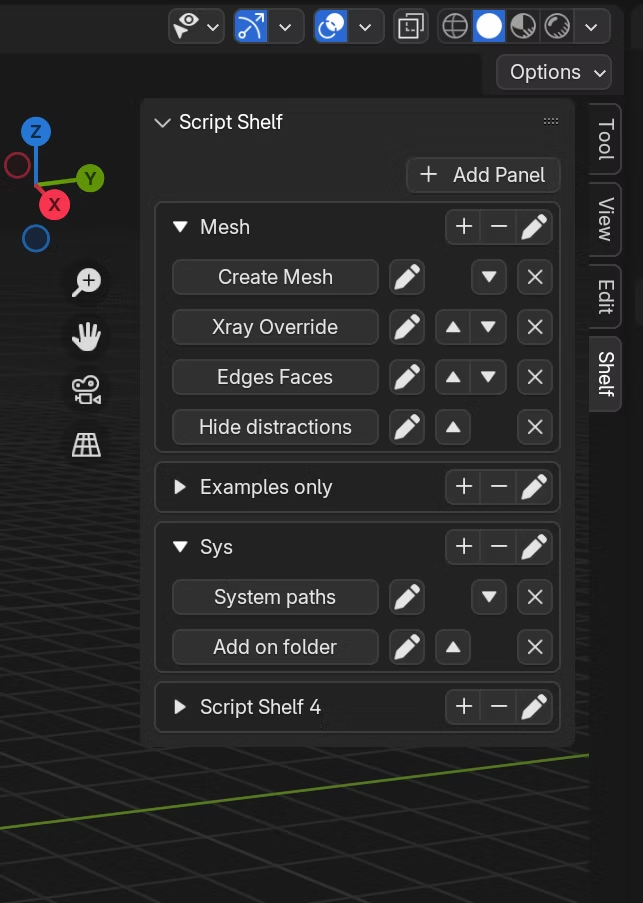
Introducing a Blender Add-On: Custom Script Shelf
A Blender add-on that brings Maya/Max-style custom script shelves to Blender, with copy-paste script management and panel-based organisation.
As a new Blender enthusiast, you might find yourself missing a familiar feature from other 3D software like Maya or 3ds Max: a custom shelf or toolbar to organise and quickly execute your scripts. I faced the same frustration after learning Blender last week and was surprised that such a basic feature was missing.
Determined to fix this, I created a Custom Script Shelf Add-On: a solution that makes managing scripts in Blender easy, intuitive, and automated. This post introduces the add-on, highlights its features, and gives an overview of how to install and use it.
Features at a glance
-
Copy-paste simplicity for scripts
- Add scripts to your shelf by simply copying and pasting them. No need to mess with files, folders, or directory structures.
-
Organise your shelf your way
- Reorder, rename, and move scripts across panels within Blender. You can organise scripts into subpanels for better categorisation.
-
Edit scripts directly in Blender
- Modify saved scripts from within Blender's text editor, streamlining your workflow.
-
Add Blender built-in items to the shelf
- Add frequently used Blender menu items directly to your shelf using a right-click context menu.
-
Remove panels or delete scripts easily
- Clean up your workspace by removing panels or scripts with a click.
-
Backup shelves between Blender installations
- Safeguard your scripts and settings by saving the add-on folder (
%appdata%/Blender Foundation/Blender/4.2/scripts/addons) and restoring it on new installations.
- Safeguard your scripts and settings by saving the add-on folder (
Conclusion
The Custom Script Shelf Add-On bridges a gap in Blender's functionality, giving you a powerful way to organise and manage scripts without dealing with the hassle of files and directories. Whether you're automating repetitive tasks, running custom tools, or streamlining workflows, this add-on will become an indispensable part of your Blender setup.
Download it today. If you encounter any bugs or have feature requests, feel free to share them.