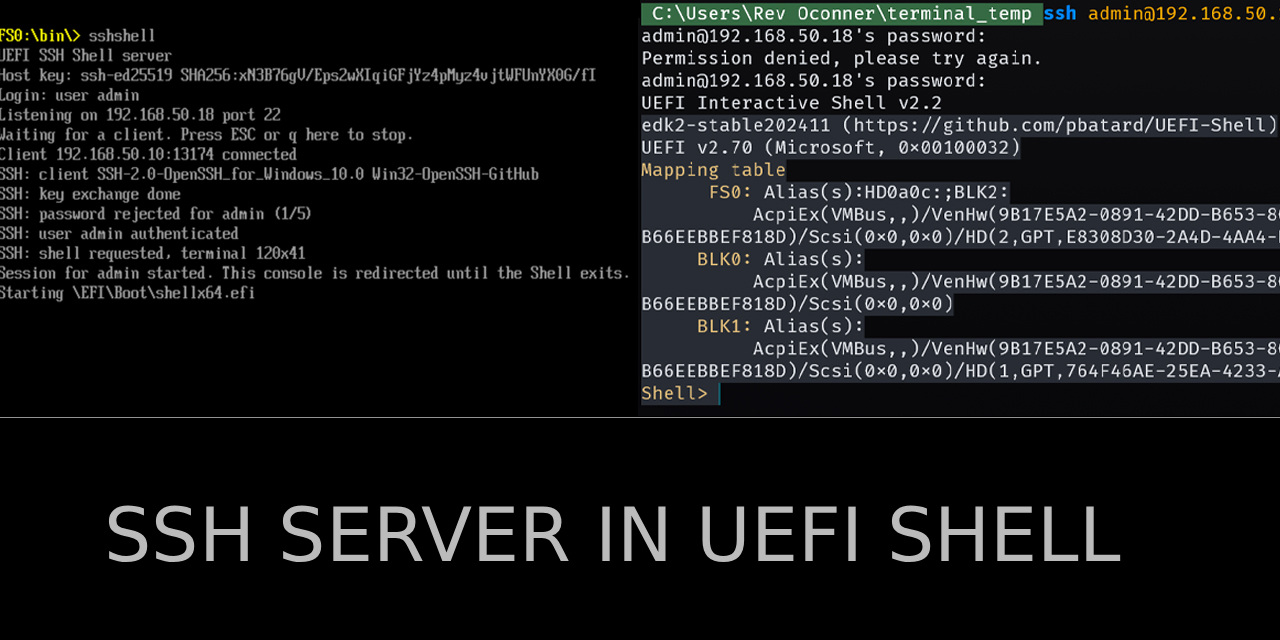
An SSH Server Inside the UEFI Shell
I wanted to ssh into a UEFI shell, couldn't find an open source one that actually worked, so I wrote one in freestanding C with no EDK2 and no libc.
I have been playing around lately inside the UEFI, using hyper-V on my workstation and UTM app on ios, just to see the things that can be done without booting up a full OS. Modern technology is like magic and the EFI shell is one of the first parts of it. I wanna dive even lower, but the shell is a good starting point for beginner. The one thing I missed however was a way to remote into the shell. Sure the EFI shell http and https network downloading, fetch, ftp clients and even an open source working implemented SSH client.
However, what if I wanna work on the shell from my PC while sitting on a couch on a linux terminal from my iphone? Or what if I wanna use the bells and whistles of Windows Terminal (resizing and high DPI scaling on a 4K screen)?
First attempt
My first attempt using a serial com and a named pipe using putty terminal but that was far from perfect. Key mapping trouble, being a serial COM meant that the mode part of the original shell was still active so forget a proper resizing when the terminal was maximised, or moved to another monitor.
Might as well build it myself
After getting Claude to go on a full search mode to find a solution, I settled on building a solution myself since nothing that existed actually satisfied the itch I had. Enters the SSH server!
What I wanted was simple. Boot into the shell, run one command, then ssh admin@<ip> from my workstation and land in Shell>. I looked around for something that did this. I found a few experiments and abandoned forks but nothing open source that I could get to actually work. So I built it.
The result is SshShell.efi, a standalone UEFI application of about 4,700 lines of C plus a small slice of wolfCrypt. It speaks SSH 2.0, does password auth, and hands the client a nested EFI Shell with working line editing, colours and resize.
The whole thing in four steps
The entry point in SshShellServer.c does this, in a loop:
- Bind a TCP4 listener. Networking has to be up already.
- Accept one client, run the SSH handshake and password auth.
- Swap
gST->ConInandgST->ConOutfor a console shim backed by the SSH channel, then start a nested Shell. - When that Shell exits, put the real console back, close the session, go back to step 2.
That's it. Everything interesting lives in how each of those steps works when there's no OS, no threads and no C library.
| File | What it does |
|---|---|
SshShellServer.c | Entry point, argument parsing, accept loop, nested Shell launch |
ssh.c | SSH 2.0 transport, key exchange, password auth, session channel |
net.c | TCP listener and connection on top of EFI_TCP4_PROTOCOL |
ConsoleShim.c | SimpleTextIn, SimpleTextInEx and SimpleTextOut backed by the SSH channel |
uefirt.c | Globals, a tiny Print, allocation, entropy, the libc subset wolfCrypt wants |
include/ | Freestanding string.h, stdlib.h, ctype.h and friends |
No EDK2, no libc
I started with an EDK2 package sketch. The SshShell.inf is still sitting in the repo as a leftover, but the actual build doesn't touch EDK2 at all. It's one batch file calling clang with the UEFI target and linking with lld-link:
clang -target x86_64-unknown-uefi -ffreestanding -fshort-wchar -mno-red-zone -mno-stack-arg-probe -fno-stack-protector -O2 -nostdlibinc ...
lld-link /subsystem:efi_application /entry:EfiMain /nodefaultlib /machine:x64 /map:build\SshShell.map /out:build\SshShell.efi ...
-fshort-wchar matters because UEFI strings are UTF-16 CHAR16, and -mno-red-zone matters because firmware interrupt handlers are allowed to stomp below the stack pointer. You need LLVM 18 or newer for the UEFI target to exist.
Since there's no libc, uefirt.c provides the handful of functions wolfCrypt expects: memcpy, memset, strcmp, atoi, the ctype set, plus XMALLOC/XFREE mapped onto boot services pool allocation. Byte loops on purpose. Nothing clever. From wolfSSL 5.9.2 I only compile the files I actually need: AES, SHA-256, SHA-512, HMAC, curve25519, ed25519 and their field and group operations, and the RNG glue. The crypto config lives in user_settings.h.
Networking is a polling loop
There are no threads in UEFI. The TCP stack is EFI_TCP4_PROTOCOL, which is asynchronous in the sense that you hand it a completion token with an event, and then it's your job to keep poking it until the event fires. If nothing polls, nothing happens.
So every network operation in net.c ends up in some version of this:
static EFI_STATUS WaitToken(EFI_TCP4_PROTOCOL *tcp, EFI_TCP4_COMPLETION_TOKEN *tok, UINTN timeoutMs)
{
    UINTN  spins = 0;
    UINT64 start = RtNow();
    for (;;) {
        tcp->Poll(tcp);
        if (gBS->CheckEvent(tok->Event) == EFI_SUCCESS) {
            return tok->Status;
        }
        gBS->Stall(100);
        spins++;
        if (timeoutMs != 0 && RtTimedOut(start, spins, 100, timeoutMs)) {
            return EFI_TIMEOUT;
        }
    }
}
Call Poll, check the event, stall 100 microseconds, repeat. It's not pretty and it burns a core while waiting, but the firmware isn't doing anything else anyway. While it waits for a client, the loop also checks the local keyboard, so pressing ESC or q on the machine itself stops the server cleanly.
One thing to know before you run it: the listener can't bind until the network interface is configured. On the target that's one line before starting the server:
Shell> ifconfig -s eth0 dhcp
Shell> SshShell.efi
The SSH side
ssh.c is the biggest file at about 1,600 lines. It's a hand written SSH 2.0 server: version exchange, KEXINIT negotiation, Diffie Hellman over curve25519, key derivation, the encrypted packet layer, user auth, and a single session channel with pty-req, shell and window-change handling. wolfCrypt only does the primitives. Everything protocol shaped is mine.
I kept the algorithm list short on purpose. Every algorithm offered is code that has to be right.
| Category | Offered |
|---|---|
| Key exchange | curve25519-sha256, plus the @libssh.org alias |
| Host key | ssh-ed25519 |
| Cipher | aes128-ctr, aes192-ctr, aes256-ctr |
| MAC | hmac-sha2-256, hmac-sha2-512 |
| Compression | none |
Current OpenSSH clients connect with this set without any extra flags. Rekeying started by the client is handled. The server never starts one itself.
The host key is an ed25519 seed. On the first build, genkey.py writes 32 random bytes into hostkey.h, and the server prints the SHA256 fingerprint on start so you can check it against what your client shows. Keep that file, or every rebuild gets a new host key and your known_hosts starts yelling.
Entropy without an OS
Key exchange needs good random numbers, and there's no /dev/urandom here. UefiRandSeed in uefirt.c tries RDRAND first and only falls back to the firmware's EFI_RNG_PROTOCOL when the CPU doesn't have it:
/* RDRAND first. The firmware RNG protocol is only consulted when the CPU has no RDRAND, since some firmware implementations are slow or block. */
if (HaveRdrand()) {
    ...
}
if (!haveSource && !EFI_ERROR(gBS->LocateProtocol(&gEfiRngProtocolGuid, NULL, (VOID **)&rng)) && rng != NULL) {
    ...
}
On top of whichever source wins, it XORs in some timing jitter from the TSC and the RTC. That jitter is weak on its own and only there as a supplement. If neither real source exists the function reports failure instead of pretending.
The console shim, which is the actual trick
This is the part I'm happiest with, and it's also the reason the whole thing works without modifying the Shell at all.
The EDK2 Shell reads keys from gST->ConIn and writes to gST->ConOut. It doesn't care what's behind those pointers. A serial console redirect uses exactly this: it installs its own text protocols and the Shell happily talks to a UART. So I do the same thing, except my protocols are backed by an SSH channel.
ShimInstall builds a full EFI_SIMPLE_TEXT_INPUT_PROTOCOL, EFI_SIMPLE_TEXT_INPUT_EX_PROTOCOL and EFI_SIMPLE_TEXT_OUTPUT_PROTOCOL, installs them on a new handle, saves the old pointers, and swaps them into the system table:
S->OldConIn = gST->ConIn;
S->OldConOut = gST->ConOut;
S->OldStdErr = gST->StdErr;

gST->ConIn = &S->TextIn;
gST->ConOut = &S->TextOut;
gST->StdErr = &S->TextOut;
gST->ConsoleInHandle = S->Handle;
gST->ConsoleOutHandle = S->Handle;
gST->StandardErrorHandle = S->Handle;
FixCrc();
FixCrc is easy to forget. The system table carries a CRC32 in its header, and once you've edited the table you're supposed to recompute it:
static void FixCrc(void)
{
    UINT32 crc = 0;
    gST->Hdr.CRC32 = 0;
    gBS->CalculateCrc32(gST, gST->Hdr.HeaderSize, &crc);
    gST->Hdr.CRC32 = crc;
}
Then the server launches a nested Shell, and that Shell picks up the swapped console as if it were the real one.
The Shell never knows where its keyboard went. It just reads keys, and the keys happen to come from the other side of an encrypted TCP connection.
Input: bytes into key strokes
The SSH client sends raw bytes: printable UTF-8, control characters, and ANSI escape sequences for arrows, Home, End, Delete, function keys. The Shell wants EFI_KEY_DATA with a scan code and a CHAR16. The shim runs every incoming byte through a small UTF-8 decoder and an escape sequence parser (HandleCsi for ESC [ sequences, HandleSs3 for ESC O) and pushes the result into a 256 entry ring.
A lone ESC is ambiguous. It could be the Escape key, or the first byte of an arrow key that hasn't fully arrived yet. So the parser holds it, and if nothing follows within a short timeout it flushes it as a plain Escape.
The WaitForKey events are EVT_NOTIFY_WAIT events whose notify function pumps the SSH connection. So when the Shell sits in WaitForEvent waiting for a key, it's actually driving the network. That's the polling problem from earlier, solved by hiding it inside the thing the Shell was going to call anyway.
Output: CHAR16 into a terminal
Going the other way, ShimOutputString turns UTF-16 into UTF-8 and translates attribute and cursor calls into ANSI escapes. Colours map onto the 16 standard ANSI colours.
The fiddly bit is the cursor. The Shell's line editor trusts Mode->CursorColumn and Mode->CursorRow to know where it is, so the shim has to model the cursor the same way xterm does, including the pending wrap state at the right edge. If that model drifts even by one column, line editing turns into garbage the moment a command wraps. Terminal size comes from the client's pty-req and window-change messages, so resizing the window works.
When the client disappears
This one I thought about a lot, because it's the failure that leaves a machine in a bad state. If the SSH client drops while the nested Shell is running, the Shell is still sitting there waiting for keys from a connection that no longer exists.
So the shim cleans up after itself. It fires a Ctrl-C through the key notify path so a running command gets a break, then types exit into the Shell for it:
static void InjectExit(CONSOLE_SHIM *S)
{
    const char *cmd = "exit";
    if (!KeysEmpty(S) || S->ExitInjects >= SHIM_EXIT_INJECT_MAX) {
        return;
    }
    S->ExitInjects++;
    while (*cmd != 0) {
        PushKey(S, SCAN_NULL, (CHAR16)*cmd++);
    }
    PushKey(S, SCAN_NULL, CHAR_CARRIAGE_RETURN);
}
At the same time it falls back to the real local keyboard and mirrors output to the real screen. Whoever is physically at the machine can see what the stuck Shell is doing and type into it. The machine is never left without a keyboard. Once the Shell exits, ShimRemove restores the original pointers, fixes the CRC again, and the server goes back to listening.
Finding a Shell to launch
The nested Shell has to come from somewhere, and firmwares disagree on where. LaunchShell tries, in order:
- The path given with
-s, if any. - A Shell embedded in a firmware volume, found by the standard ShellPkg file GUID. This works on OVMF and most EDK2 based firmwares.
- Files on the same volume
SshShell.efiwas loaded from:Shell.efiorshellx64.efinext to it, then a list of the usual places like\EFI\Boot\shellx64.efi.
Hyper-V's firmware doesn't ship a Shell in its volumes at all, so on that VM the file fallback is what gets used. The nested Shell gets -nostartup by default so it doesn't re-run startup.nsh and launch another copy of the server inside itself. You can change that with -o.
The full command line:
SshShell.efi [-p port] [-u user] [-w password] [-s \path\Shell.efi] [-o "shell options"] [-d]Defaults are port 22, user admin, password admin. -d traces every packet and every TCP transfer on the local console, which is the first thing to turn on when a client hangs.
Testing without rebooting a VM every time
Debugging an SSH handshake inside firmware is slow. Every change means rebuilding, copying the .efi over, rebooting the VM, running ifconfig, starting the server, and connecting. So I didn't do most of the protocol work there.
The test/ folder has a native Windows harness. It builds the exact same ssh.c against a plain socket layer and serves a trivial echo shell on a loopback port. That lets real clients like OpenSSH and plink hit the real handshake, auth and channel code on my desktop in a second. Only the parts that genuinely need firmware, the TCP4 protocol and the console shim, got debugged inside the VM.
The memory runaway
The 32-bit word64
One bug is worth a proper mention, because it took the longest to find and nothing about the crash pointed at it. At one point the VM died with RIP at 0x1df70d54 while the image was loaded at 0x1df66000. That's offset 0xAD54 into the binary, and this is why the build always writes SshShell.map: it turns a raw RIP from a firmware crash into a function name.
The name pointed into RNG init, which made no sense at first. The actual cause was a type size mismatch between clang and wolfSSL.
Clang's UEFI target uses the Windows LLP64 model, so long is 4 bytes. But it doesn't define _WIN32. wolfSSL's types.h guesses integer widths from the platform, and without _WIN32 it took the "x86_64 means a 64-bit long" branch. So word64 quietly became a 32-bit type.
That alone is enough to wreck SHA-512 and ed25519 without a single warning. What actually crashed first was the constant-time min(), which shifts by 63 to build its mask. A shift by 63 on a 32-bit value is undefined, and here it produced a garbage length inside the DRBG health test that runs during RNG init. That length went into a copy, and the copy walked off the end of memory.
The fix is two lines in user_settings.h so wolfSSL stops guessing:
/* The UEFI target is LLP64 like Windows: long is 4 bytes. */
#define SIZEOF_LONG      4
#define SIZEOF_LONG_LONG 8
And so it can never happen silently again, ssh.c checks the sizes at compile time:
_Static_assert(sizeof(word64) == 8, "word64 must be 8 bytes, check SIZEOF_LONG in user_settings.h");
_Static_assert(sizeof(word32) == 4, "word32 must be 4 bytes");
_Static_assert(sizeof(wolfssl_word) == 8, "wolfssl_word must be 8 bytes on x86_64");
I also kept a sanity check in the runtime's own memcpy, memmove and memset:
/* A copy longer than this is a bug somewhere. Report the caller and stop instead of walking off the end of memory. */
#define RT_INSANE_LEN (64ULL * 1024 * 1024)

void *memcpy(void *d, const void *s, size_t n)
{
    ...
    if (n > RT_INSANE_LEN) {
        InsaneLen("memcpy", n, __builtin_return_address(0));
    }
    ...
}
Nothing legit in this program copies 64 MB in one go. If a copy asks for that, it prints the caller address and a backtrace instead of taking the firmware down. Without an OS there's no segfault to catch you, so a cheap check like this is the closest thing to one.
A freestanding target doesn't just take away libc. It takes away every assumption a portable library made about the platform it would land on.
Where this falls short
It works, but it's a lab tool, and I'd rather be clear about that than have someone put it on a real network.
| Limitation | What it means |
|---|---|
| Password auth only, one user | No public key auth yet |
| One connection at a time | Other clients wait in the TCP backlog |
| Server never starts a rekey | Client initiated rekeys are handled |
| 16 ANSI colours | Non BMP characters are dropped on input |
| Host key seed is inside the binary | Anyone with the .efi can pull it out |
| Not hardened against a hostile network | Use it on a lab network |
| Busy polling | One core spins while waiting, which firmware doesn't really care about |
The host key one is the one to take seriously. It's the price of having no persistent secure storage to read a key from at runtime. If you build your own copy, generate your own hostkey.h and don't share the binary.
Why bother
Honestly, mostly because it didn't exist and I wanted it. But it's also a nice reminder of how much UEFI already gives you if you're willing to wire it up yourself. A TCP stack, an RNG protocol, a loader, a shell, and a console abstraction clean enough that swapping two pointers in the system table is all it takes to move a terminal onto the network. The heavy lifting was the SSH protocol and the terminal model. The firmware side was mostly plumbing.
For transparency, I built this with Claude as a co-author, and the README credits it the same way.
The source is on GitHub under GPL-3.0: EFI-sshServer.